Showing posts with label Hacks. Show all posts

Facebook Profile Photo Large Size Trick

Facebook Profile Photo Large Size Trick

Sometimes You Want To View Someone's Profile Picture which has a Only Me Restriction in it So That Others Cant See. So Here's The Trick to View it in Large Size.


How To View Facebook Locked Profile Picture ?


1. Open the facebook profile of person whose profile picture is locked or is set to private.
2. Right click on the profile picture and click on Copy Image Url as shown in image below.

Facebook Profile Photo Large Size Trick

3. Open that image in new tab by  right clicking and selecting Paste (CTRL + V)
4. Now change the value of image size highlighted below which might be s160x160 tos720x720 (If its not clear try (s320x320)
5. The image will enlarge in size. This trick does not always work.

Facebook Page New Admin Restriction Bypass

Warning :- This Article is based on the social media Facebook and it is just to show the concept of how an attacker can use such techniques to bypass the Facebook restrictions for adding new admin from anonymous location and i am not responsible for any of you act caused after reading this article as its just to clear the concept not to damage any organization.


In Past i have seen that facebook is working hard to create its high end security to prevent hackers from attacking facebook accounts, pages , groups etc and i must say facebook is very smart on handling the hackers.


In Facebook when anyone hack,s the facebook id of someone and then he found some big page and tries to kick out the owner from his page and grab that page by making himself as admin of that big page.

When he ( hacker ) tries to create himself directly as admin of that page and click saves and after entering the password bang bang happens with hacker yes Facebook Automatically Locks that Account of which hacker was trying to hijack the page.

After Facebook locks his account when hacker tries to login again on that hacked account Facebook forces him to verify his account by verifying the photos of his friends and if its a hacker he cant verify that account and Facebook hangs that hacker by saying silent message say no more to hack.


Logic Behind This Mega Drama by Facebook ? 

Its like a master mind behind this , well what Facebook dose is below


  • Facebook Checks if the user location match
  • Cookies Identification 
  • Web Browser and OS identification
  • Suspicious Activity


  1.  Facebook check,s if your location matches even limited to city like if you signed in from Karachi City of Pakistan then facebook will check if you are signed in from Karachi or not.                                                                                                                                                                                                                                                            
  2. Suspicious Activity , Yes Facebook checks if your activity is suspicious like you signed in and immediately change the password of that account and then goto that page and try to make yourself as admin.  


How To bypass such restriction to hijack the page(s) ? 

To Bypass follow simple steps as mentioned below


  1. Login to the user account for at least 3 times before trying to make yourself as admin of that page .                                                                                                                                                 
  2. Better to use the proxy server of that city if you know the location of the person who,s account is.                                                                                                                                                         
  3. Wait for at least 3-5 minutes after changing the password or better not to change and also wait for at least 4-6 minutes after hijacking one page do not bother just wait after hijacking one page. 
  • 1- The Reason why you login 3 times before hijacking or hacking the page is Facebook checks back the location when you login if your location is different from the last 3 login attempts which were made they will not allow you to hijack and will lock the account and if you login to that page 3 times 
  • 3- As i mentioned that Facebook also detects your activity if its suspicious then they will block you , for example changing the password immediately or hijacking the page one after another immediately without waiting for a sec.

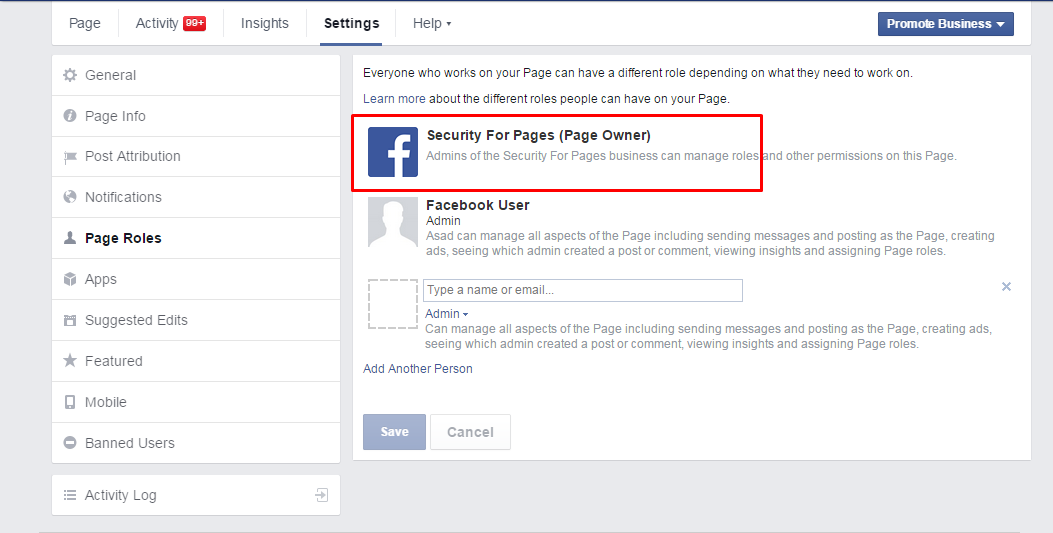
Remove Permanent Manager From Page on Which You are Admin

Looking For a Trick To Remove Page Owner From The Page? So Here it is...

Check if You Are The Admin of The Page (Not The Editor)

So Permanent Manager Looks Like This
    

Here You Cant See Who is The Real Admin of this page.
So What you have to do is Very Simple.

1. Make Sure you Have any Android Device
2. Download Pages Manager From Google Play
3. After You Login To  Pages Manager Go To The Page Settings and Then Edit Page Roles
4. There You Will See How Many People are Admin Except You and You Can Remove Them
5. After You Remove All Of Other Admins The Permanent Manager Will Be Removed and Now You are The New Page Owner.

Note : This Trick Only Works If The Page is Not Primary Business Page.